Are you looking to measure electrical current safely and easily? A digital clamp multimeter is the perfect tool for you.
It lets you check current without touching wires or turning off power. In this guide, you’ll learn exactly how to use a digital clamp multimeter step by step. By the end, you’ll feel confident handling your electrical tasks like a pro.
Keep reading to unlock simple tips that save you time and keep you safe.
Choosing The Right Multimeter
Choosing the right digital clamp multimeter makes your work easier and safer. A good multimeter fits your needs and helps measure electrical values accurately. It is important to know which type suits your tasks and what features matter most. This guide breaks down the options to help you decide.
Types Of Digital Clamp Multimeters
There are several types of digital clamp multimeters. Basic models measure current, voltage, and resistance. Advanced models also check frequency, capacitance, and temperature. Some clamp meters have True RMS for precise readings on complex signals. Choose a type based on the measurements you need to make.
Handheld clamp meters are portable and easy to use. Bench clamp meters offer more features and higher accuracy. Some clamp meters come with wireless connectivity to send data to a smartphone or computer. Pick the type that matches your work environment and tasks.
Key Features To Look For
Accuracy is one of the most important features. Look for meters with low error margins. A clear digital display helps read values quickly. Backlit screens are useful in dark spaces. Auto-ranging saves time by selecting the correct measurement range automatically.
Safety ratings like CAT III or CAT IV protect you during high voltage work. A strong clamp jaw opens wide enough for large cables. Data hold function freezes the reading on the screen for easy recording. Check battery life and ease of replacing batteries before buying.

Credit: kaiweets.com
Preparing The Multimeter
Preparing your digital clamp multimeter is the first step to accurate measurements. Proper preparation ensures safety and reliable results. Before starting, always check the device thoroughly. This helps avoid errors and equipment damage.
Checking The Battery And Display
Check the battery level before use. A weak battery can cause wrong readings or the device might turn off. Replace the battery if the display is dim or flickering. Make sure the screen shows all numbers clearly. Clean the display if it is dirty or smudged. This ensures you can read values easily and correctly.
Setting The Correct Measurement Mode
Set the multimeter to the right mode for your task. The clamp meter has modes like voltage, current, and resistance. Choose the mode that matches what you want to measure. Using the wrong mode can damage the meter or give false readings. Turn the dial carefully to select the correct setting. Double-check the mode before you start measuring.
Measuring Current With The Clamp
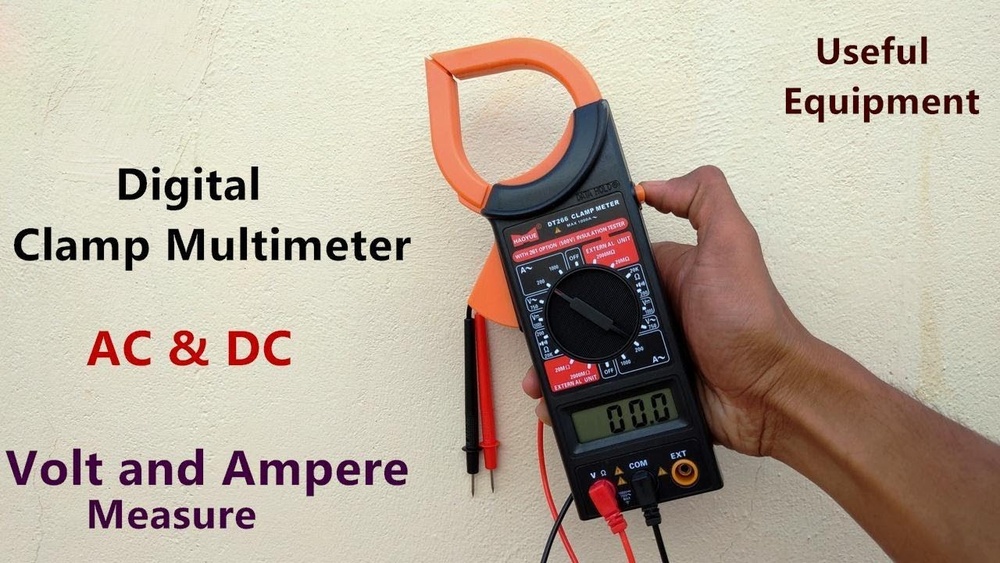
Measuring current with a digital clamp multimeter is simple and safe. This tool lets you check electrical current without cutting wires. Just clamp around a single conductor, and the meter shows the current flowing through it. It saves time and avoids direct contact with live wires.
Positioning The Clamp Correctly
Open the clamp jaws fully before placing them. Clamp around only one wire at a time. The clamp must close completely for an accurate reading. Position the clamp straight and tight around the conductor. Avoid clamping around a cable with multiple wires inside. This causes incorrect or zero readings.
Avoiding Common Errors
Do not clamp around power cords with more than one wire. Keep your hands away from the clamp jaws during measurement. Check that the meter is set to the correct current range. Avoid moving the clamp during measurement. Make sure the clamp is clean and free of damage. Double-check the reading before recording it.
Credit: www.hioki.com
Measuring Voltage And Resistance
Measuring voltage and resistance with a digital clamp multimeter is simple and useful. These measurements help check electrical circuits and devices. Voltage tells you how much electrical power flows through a wire. Resistance shows how much a material stops the flow of electricity. Knowing how to measure both can keep your devices safe and working well.
Using Test Leads Safely
Always check your test leads before use. Look for cracks, breaks, or worn insulation. Damaged leads can cause shocks or wrong readings. Hold the insulated part of the lead only. Avoid touching metal tips during measurement. Connect the black lead to the common (COM) port first. Attach the red lead to the correct port for voltage or resistance. Keep your hands dry and away from live wires. Safety first, always.
Selecting The Right Settings
Turn the dial on your multimeter to the correct function. For voltage, choose V with a straight or wavy line. For resistance, select the Ω symbol. Pick the right range if your meter does not auto-range. Start with the highest value and go down for accuracy. Wrong settings can damage the meter or give false readings. Double-check before measuring. Accuracy depends on correct settings.
Interpreting The Readings
Reading the results on a digital clamp multimeter is key to using it well. The screen shows numbers and symbols that tell you about the electrical values. Understanding these readings helps you check circuits safely and correctly. It also ensures you get the right information for your work or project.
Understanding Display Symbols
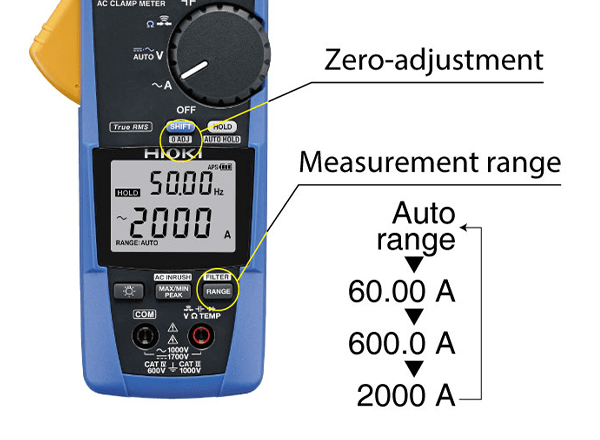
The digital clamp multimeter display shows various symbols. Each symbol means something specific. For example, “AC” means alternating current, and “DC” means direct current. A battery icon shows the battery status of the meter. The “hold” symbol means the meter is keeping the last reading on screen.
Other symbols include the diode test symbol and the continuity beep icon. These help you test different electrical parts. Knowing these symbols avoids confusion and mistakes. It makes your work faster and safer.
Tips For Accurate Results
Keep the clamp steady around the wire. Moving it can change the reading. Make sure the wire is centered in the clamp for best results. Avoid clamping multiple wires together; it can cause wrong readings.
Check the meter’s settings before starting. Choose the right mode for the measurement. Use fresh batteries to keep the meter working well. Also, clean the clamp and probes to get clear readings. Follow these tips to trust the numbers you see.
Maintenance And Care
Taking care of your digital clamp multimeter keeps it working well for a long time. Proper maintenance stops damage and errors during use. Small steps help your tool stay accurate and safe.
Cleaning And Storage
Always clean the multimeter after use. Wipe the surface with a soft, dry cloth. Avoid using water or strong chemicals. Dirt and dust can cause wrong readings. Store the multimeter in a dry, cool place. Use the case that comes with it. Keep it away from direct sunlight and moisture. Proper storage prevents battery leaks and corrosion.
Troubleshooting Common Issues
If the display is dim or flickers, check the battery first. Replace old batteries with new ones. Loose or damaged test leads can cause errors. Inspect the wires for cuts or breaks. Tighten any loose connections. If the multimeter does not turn on, try resetting it. Press the power button for a few seconds. For inaccurate readings, recalibrate or consult the manual. Regular checks avoid bigger problems later.
Credit: www.youtube.com
Frequently Asked Questions
What Is A Digital Clamp Multimeter Used For?
A digital clamp multimeter measures electrical current without direct contact. It also tests voltage, resistance, and continuity efficiently. It is essential for electricians and technicians for safe and quick diagnostics.
How Do You Measure Current With A Clamp Multimeter?
To measure current, open the clamp jaws and encircle one conductor. Ensure the multimeter is set to the correct current range. The display shows the current flowing through the conductor instantly.
Can A Clamp Multimeter Measure Ac And Dc Current?
Most clamp multimeters measure AC current accurately. Some advanced models also measure DC current. Check your device specifications before testing DC circuits for precise readings.
How Do You Ensure Safety When Using A Clamp Multimeter?
Always wear protective gear and follow electrical safety guidelines. Verify the multimeter’s rating matches the circuit voltage. Never clamp around multiple conductors simultaneously to avoid inaccurate readings or hazards.
Conclusion
Using a digital clamp multimeter makes electrical testing safe and simple. Always follow safety steps to avoid risks. Check your readings carefully for accurate results. Practice often to become more confident with the tool. This device saves time and helps find problems fast.
Keep your multimeter clean and store it properly. With steady use, you will handle electrical tasks better. A digital clamp multimeter is a helpful tool for many jobs.

I’m Asif Ur Rahman Adib, an Electrical Engineer and lecturer. My journey began in the lab, watching students struggle with instruments they used every day without fully understanding them. Over time, I’ve combined teaching, research, and hands-on experience to help others grasp electrical concepts clearly, safely, and practically—whether it’s understanding a circuit or mastering a multimeter.